

Overview
Software Composition Analysis (SCA) automatically detects third-party dependencies in your codebase and checks them against a unified, continuously updated vulnerability intelligence database. Modern applications are built heavily on open-source packages—often comprising 70-90% of a codebase. Codepure SCA parses your project’s lockfiles to map your entire dependency tree, including deeply nested transitive dependencies, and flags vulnerable versions before they reach production. Every scan produces a comprehensive Software Bill of Materials (SBOM) and a prioritized vulnerability report with exact remediation paths.What Codepure SCA Detects
Codepure SCA identifies and reports on:- Known Vulnerabilities (CVEs) — Every package version is checked against a unified advisory database aggregating multiple vulnerability intelligence sources, covering hundreds of thousands of advisories across all supported ecosystems.
- Direct Dependencies — Packages your project explicitly imports.
- Transitive Dependencies — Dependencies-of-dependencies, traced through arbitrary nesting depth (3+ levels). No hidden risk goes undetected.
- Multi-Format Coverage — 27+ lockfile and manifest formats across 20+ package ecosystems, ensuring no language or build system is left behind.
How the Engine Works
Codepure’s SCA is built for speed and precision, executing entirely through static lockfile analysis—no local build tools, compilers, or agents required.- Discovery: The engine scans your repository for known package manager lockfiles and configuration files, automatically applying lockfile-over-manifest priority rules.
- Graphing: It parses each file format natively to build a complete dependency graph, extracting exact package names and pinned versions.
- Matching: Dependencies are matched against an in-memory index of our unified vulnerability database, with version-range comparison semantics that correctly handle semver, distro-specific versioning, and pre-release variants.
- Reporting: Codepure generates a JSON-formatted SBOM and a prioritized vulnerability report with severity ratings, CWE classifications, and exact remediation paths (the specific version you must upgrade to).
Supported Ecosystems & Lockfiles
Codepure natively parses the following package manager files. For the most accurate results, commit resolved lockfiles (e.g.,package-lock.json) to source control rather than relying solely on manifests (e.g., package.json).
Transitive Dependency Detection
Codepure does not stop at your direct imports. The engine traces dependency graphs through arbitrary nesting depth, uncovering vulnerabilities hiding several layers deep in your supply chain. Example scenario your scan will catch:- Your project imports
express@4.18.2(direct) expressdepends onbody-parser@1.20.0(1 level deep)body-parserdepends onqs@6.11.0(2 levels deep)qshas a known prototype pollution vulnerability (3 levels deep)
qs vulnerability and show you the full dependency path: express → body-parser → qs, so you know exactly which dependency to upgrade.
Severity Classification
Every vulnerability is classified into one of four severity tiers:Software Bill of Materials (SBOM)
A Software Bill of Materials (SBOM) is a complete, machine-readable inventory of every component that makes up your software—including version, ecosystem, provenance, and dependency relationships. Codepure automatically generates an SBOM for every successful scan.Why SBOMs Matter
- Incident Response: When a zero-day vulnerability is disclosed, an SBOM lets you instantly query whether your application is affected—reducing mean-time-to-respond from days to seconds.
- Supply Chain Transparency: Tracks component provenance and maps transitive dependency relationships across your entire software supply chain.
- Compliance & Auditing: Meets regulatory requirements including Executive Order 14028, NIST SP 800-161, and ISO/IEC standards. Codepure’s SBOM format is compatible with CycloneDX 1.5.
What Codepure Extracts
For every component detected, the SBOM records:- Package Name and Pinned Version
- Ecosystem (e.g., npm, Maven, Conan, crates.io)
- Source file where the dependency was discovered
- Transitive dependency graph (
dependsOnrelationships) - Associated CVEs, severity scores, and CWE classifications
- Recommended fix version (when available)
Using Codepure SCA
1. Initiate a Scan
Navigate to your project dashboard and select the repository to scan:
2. Review Vulnerabilities
Once the scan completes, access the findings: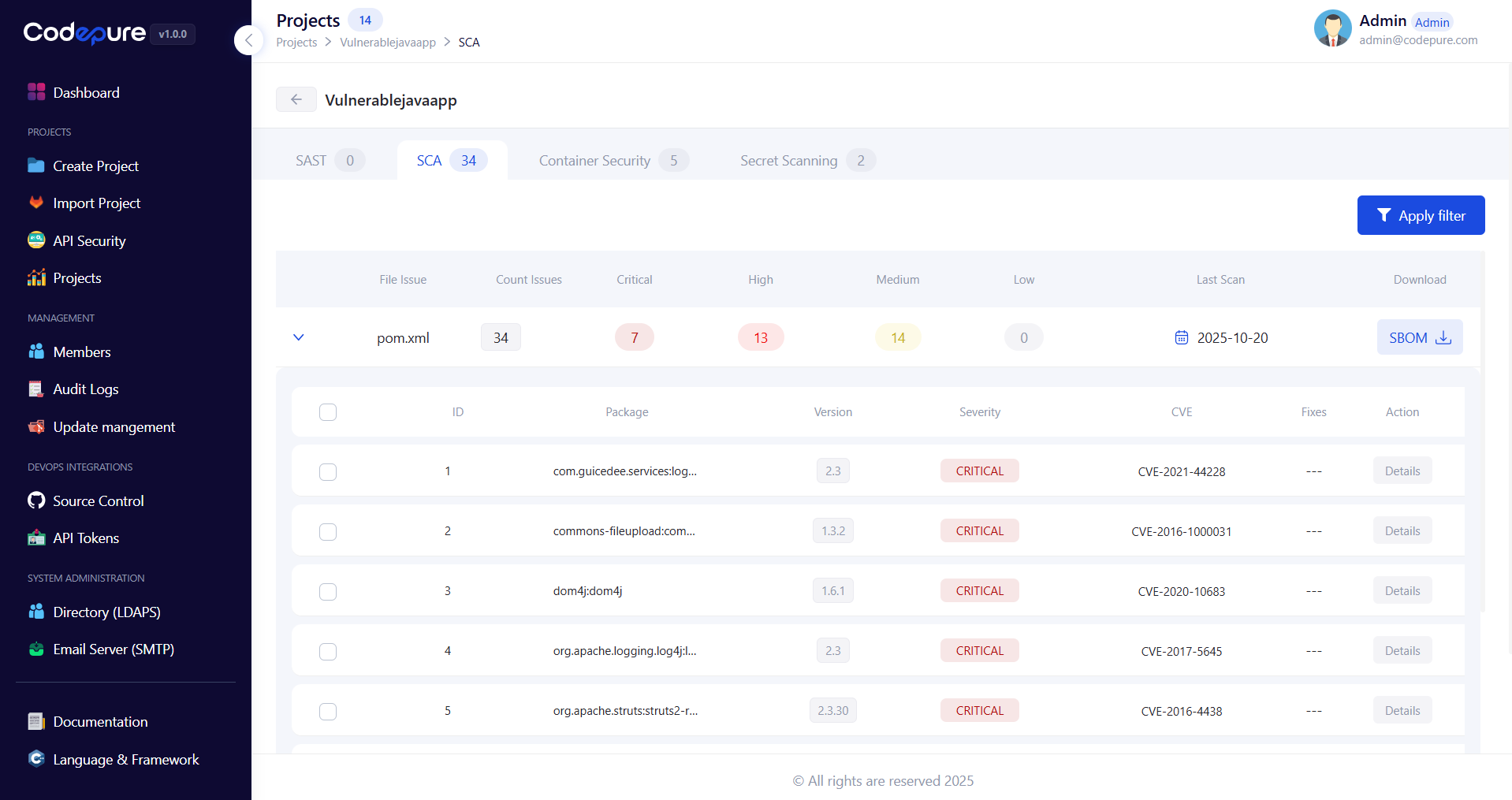
- Severity Ratings: Vulnerabilities are scored (Critical, High, Medium, Low) based on CVSS metrics and exploit intelligence.
- Dependency Path: See the full transitive chain from your project to the vulnerable package.
- Remediation: Click into any finding to see the exact version you need to upgrade to in order to clear the vulnerability.
3. Download Your SBOM
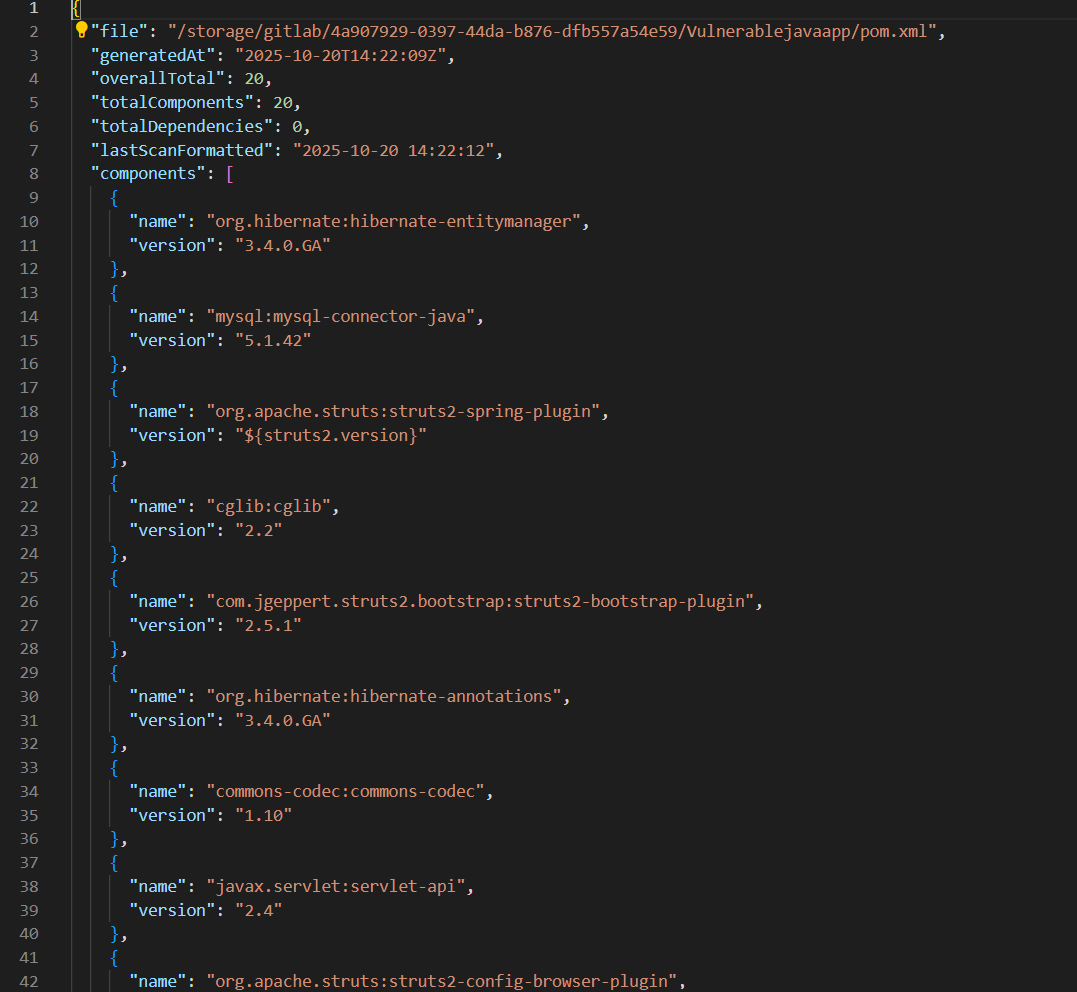
Best Practices
- Commit Your Lockfiles: Always commit resolved lockfiles (
package-lock.json,poetry.lock,Cargo.lock, etc.) to source control. Scanning an exact lockfile guarantees analysis of the precise dependency versions running in production—preventing environment drift and missed vulnerabilities. - Scan on Every Pull Request: Integrate Codepure into your CI/CD pipeline to automatically block PRs that introduce new Critical or High severity dependencies. Catching vulnerabilities before merge is dramatically cheaper than post-deployment remediation.
- Upgrade Incrementally: When updating heavily outdated packages, upgrade one major version at a time to prevent breaking changes in your application logic while closing security gaps.
- Don’t Ignore Transitive Dependencies: A vulnerability in a deeply nested transitive dependency is just as exploitable as one in a direct import. Review the full dependency path in every finding and upgrade the transitive chain when possible.
- Treat Your SBOM as a Living Artifact: Generate an SBOM on every release and store it alongside your deployment artifacts. When the next critical CVE is disclosed, you will know within seconds whether you are affected.