> ## Documentation Index
> Fetch the complete documentation index at: https://guide.codepure.com/llms.txt
> Use this file to discover all available pages before exploring further.
# Software Composition Analysis (SCA)
> Identify and fix vulnerable open-source dependencies across 20+ ecosystems and 27+ lockfile formats.
## Overview
Software Composition Analysis (SCA) automatically detects third-party dependencies in your codebase and checks them against a unified, continuously updated vulnerability intelligence database.
Modern applications are built heavily on open-source packages—often comprising 70-90% of a codebase. Codepure SCA parses your project's lockfiles to map your entire dependency tree, including deeply nested transitive dependencies, and flags vulnerable versions before they reach production. Every scan produces a comprehensive Software Bill of Materials (SBOM) and a prioritized vulnerability report with exact remediation paths.
## What Codepure SCA Detects
Codepure SCA identifies and reports on:
* **Known Vulnerabilities (CVEs)** — Every package version is checked against a unified advisory database aggregating multiple vulnerability intelligence sources, covering hundreds of thousands of advisories across all supported ecosystems.
* **Direct Dependencies** — Packages your project explicitly imports.
* **Transitive Dependencies** — Dependencies-of-dependencies, traced through arbitrary nesting depth (3+ levels). No hidden risk goes undetected.
* **Multi-Format Coverage** — 27+ lockfile and manifest formats across 20+ package ecosystems, ensuring no language or build system is left behind.
## How the Engine Works
Codepure's SCA is built for speed and precision, executing entirely through static lockfile analysis—no local build tools, compilers, or agents required.
1. **Discovery:** The engine scans your repository for known package manager lockfiles and configuration files, automatically applying lockfile-over-manifest priority rules.
2. **Graphing:** It parses each file format natively to build a complete dependency graph, extracting exact package names and pinned versions.
3. **Matching:** Dependencies are matched against an in-memory index of our unified vulnerability database, with version-range comparison semantics that correctly handle semver, distro-specific versioning, and pre-release variants.
4. **Reporting:** Codepure generates a JSON-formatted SBOM and a prioritized vulnerability report with severity ratings, CWE classifications, and exact remediation paths (the specific version you must upgrade to).
## Supported Ecosystems & Lockfiles
Codepure natively parses the following package manager files. For the most accurate results, commit resolved lockfiles (e.g., `package-lock.json`) to source control rather than relying solely on manifests (e.g., `package.json`).
| Language / Ecosystem | Lockfiles & Manifests Scanned |
| :-------------------------- | :--------------------------------------------------------------------------------------------------------------------------------- |
| **JavaScript / TypeScript** | `package-lock.json`, `yarn.lock`, `pnpm-lock.yaml`, `pnpm-lock.yml`, `npm-shrinkwrap.json`, `bun.lock`, `deno.lock`, `libman.json` |
| **Python** | `requirements.txt`, `requirements.lock`, `requirements.yml`, `poetry.lock`, `Pipfile.lock`, `uv.lock`, `pdm.lock` |
| **Java / Scala / Kotlin** | `pom.xml`, `gradle.lockfile`, `build.gradle`, `build.gradle.kts`, `ivy.xml`, `build.sbt`, `.jar`, `.war`, `.ear` |
| **.NET (C# / F#)** | `packages.lock.json`, `packages.config`, `*.csproj`, `*.deps.json`, `Directory.Packages.props`, `paket.lock` |
| **Go** | `go.mod` |
| **PHP** | `composer.lock` |
| **Ruby** | `Gemfile.lock` |
| **Rust** | `Cargo.lock`, `Cargo.toml` |
| **Swift / Objective-C** | `Package.resolved` (v1 & v2), `Podfile.lock` |
| **Dart / Flutter** | `pubspec.lock` |
| **Elixir** | `mix.lock` |
| **Clojure** | `deps.edn`, `project.clj` |
| **C / C++** | `conan.lock`, `vcpkg.json` |
| **Clojars** | `deps.edn`, `project.clj` (Maven-compatible advisories) |
## Transitive Dependency Detection
Codepure does not stop at your direct imports. The engine traces dependency graphs through arbitrary nesting depth, uncovering vulnerabilities hiding several layers deep in your supply chain.
**Example scenario your scan will catch:**
* Your project imports `express@4.18.2` (direct)
* `express` depends on `body-parser@1.20.0` (1 level deep)
* `body-parser` depends on `qs@6.11.0` (2 levels deep)
* `qs` has a known prototype pollution vulnerability (3 levels deep)
Codepure will flag the `qs` vulnerability and show you the full dependency path: `express → body-parser → qs`, so you know exactly which dependency to upgrade.
## Severity Classification
Every vulnerability is classified into one of four severity tiers:
| Severity | Description |
| :----------- | :-------------------------------------------------------------------------------------------------------------------------- |
| **Critical** | Actively exploited vulnerabilities with severe impact (RCE, data breach, authentication bypass). Immediate action required. |
| **High** | Significant security impact with known exploits or high CVSS scores. Remediation recommended within 30 days. |
| **Medium** | Moderate risk, may require specific conditions to exploit. Plan remediation in your next release cycle. |
| **Low** | Minor security concerns, often defense-in-depth improvements. Track and address when convenient. |
## Software Bill of Materials (SBOM)
A Software Bill of Materials (SBOM) is a complete, machine-readable inventory of every component that makes up your software—including version, ecosystem, provenance, and dependency relationships. Codepure automatically generates an SBOM for every successful scan.
### Why SBOMs Matter
* **Incident Response:** When a zero-day vulnerability is disclosed, an SBOM lets you instantly query whether your application is affected—reducing mean-time-to-respond from days to seconds.
* **Supply Chain Transparency:** Tracks component provenance and maps transitive dependency relationships across your entire software supply chain.
* **Compliance & Auditing:** Meets regulatory requirements including Executive Order 14028, NIST SP 800-161, and ISO/IEC standards. Codepure's SBOM format is compatible with CycloneDX 1.5.
### What Codepure Extracts
For every component detected, the SBOM records:
* Package Name and Pinned Version
* Ecosystem (e.g., npm, Maven, Conan, crates.io)
* Source file where the dependency was discovered
* Transitive dependency graph (`dependsOn` relationships)
* Associated CVEs, severity scores, and CWE classifications
* Recommended fix version (when available)
## Using Codepure SCA
### 1. Initiate a Scan
Navigate to your project dashboard and select the repository to scan:
 Select **SCA** from the scanner options and click **Start Scanning**. The engine will automatically locate and prioritize the relevant lockfiles across all supported ecosystems.
### 2. Review Vulnerabilities
Once the scan completes, access the findings:
Select **SCA** from the scanner options and click **Start Scanning**. The engine will automatically locate and prioritize the relevant lockfiles across all supported ecosystems.
### 2. Review Vulnerabilities
Once the scan completes, access the findings:
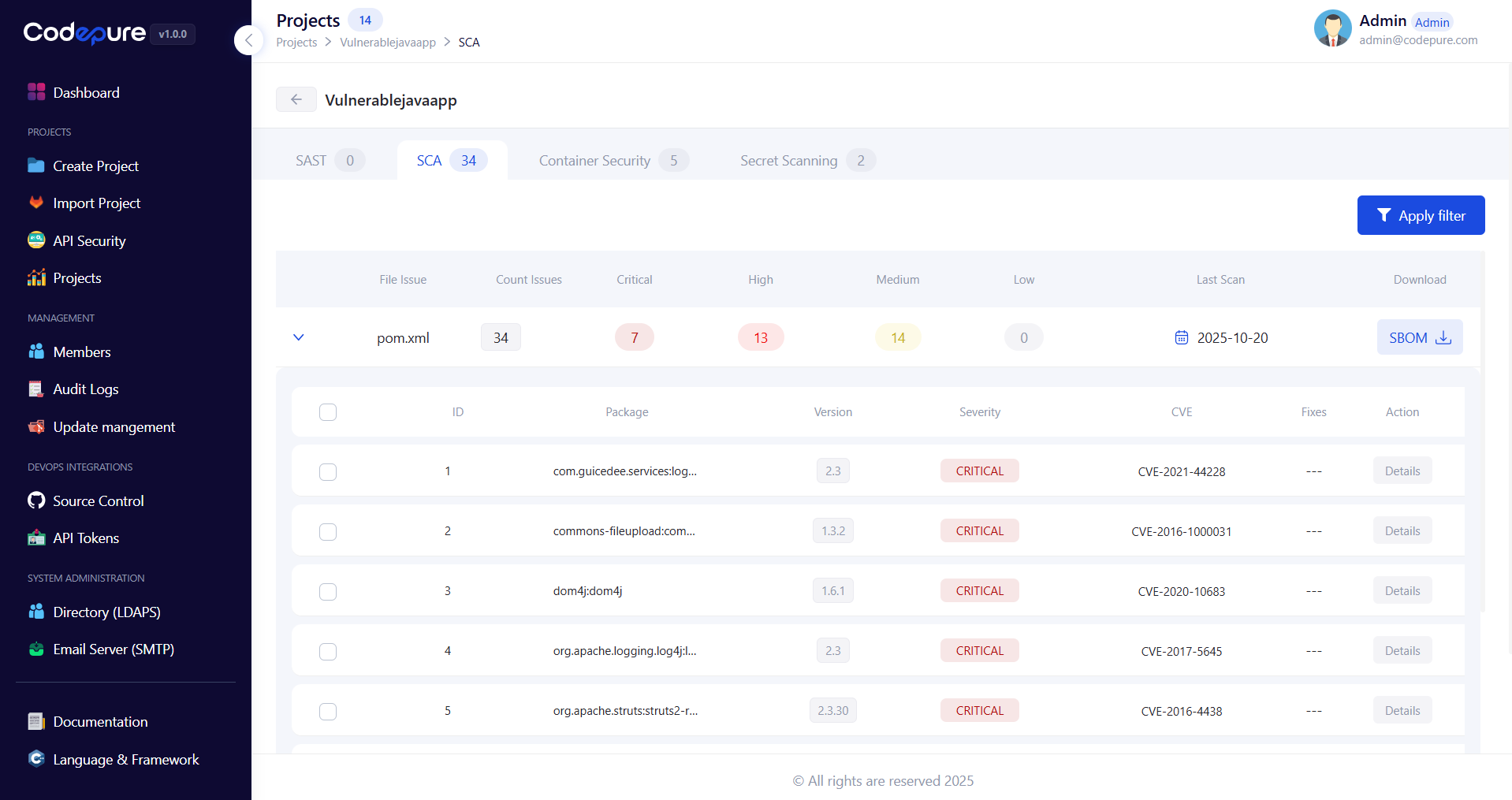 * **Severity Ratings:** Vulnerabilities are scored (Critical, High, Medium, Low) based on CVSS metrics and exploit intelligence.
* **Dependency Path:** See the full transitive chain from your project to the vulnerable package.
* **Remediation:** Click into any finding to see the exact version you need to upgrade to in order to clear the vulnerability.
### 3. Download Your SBOM
* **Severity Ratings:** Vulnerabilities are scored (Critical, High, Medium, Low) based on CVSS metrics and exploit intelligence.
* **Dependency Path:** See the full transitive chain from your project to the vulnerable package.
* **Remediation:** Click into any finding to see the exact version you need to upgrade to in order to clear the vulnerability.
### 3. Download Your SBOM
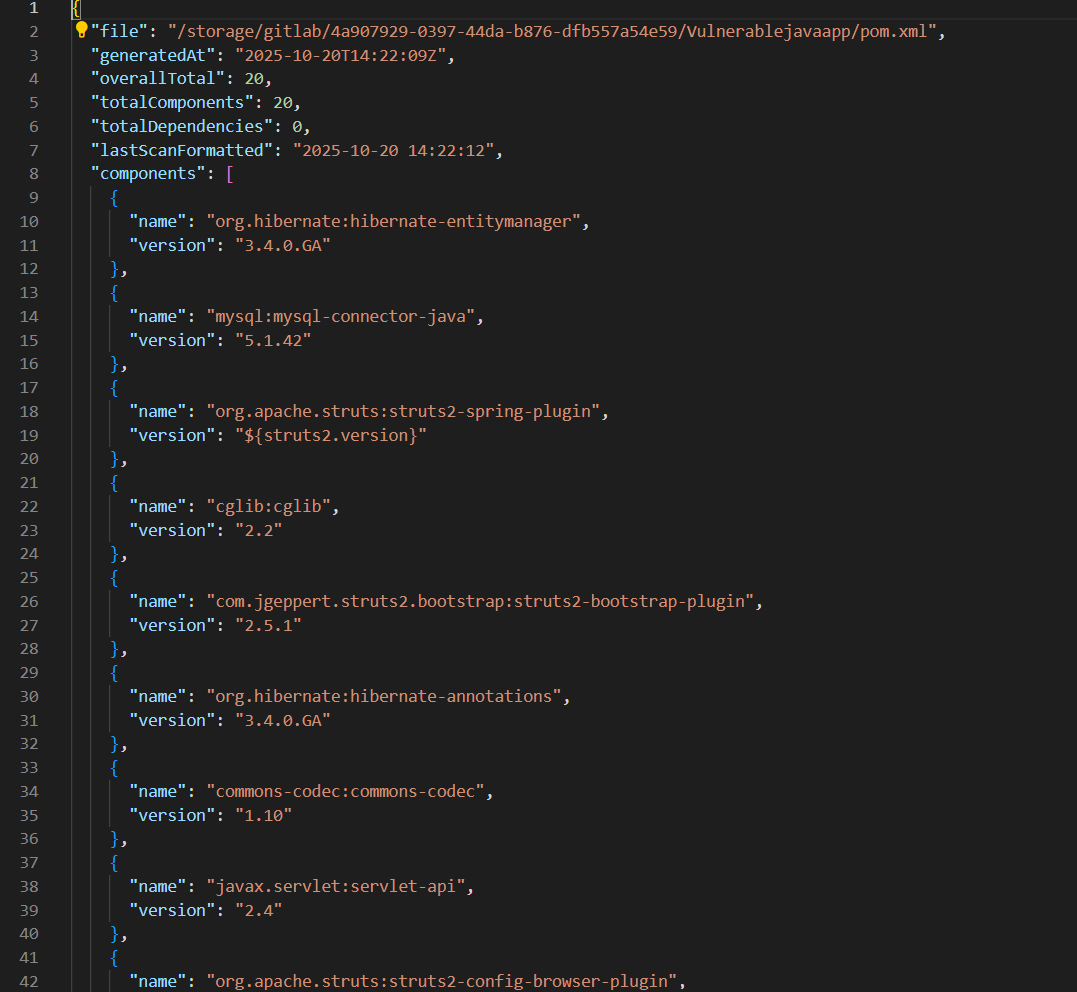 Click **Download SBOM** from the results view to export your dependency graph as a structured JSON artifact (CycloneDX 1.5 compatible) for compliance records, security audits, or integration with downstream security tooling.
## Best Practices
* **Commit Your Lockfiles:** Always commit resolved lockfiles (`package-lock.json`, `poetry.lock`, `Cargo.lock`, etc.) to source control. Scanning an exact lockfile guarantees analysis of the precise dependency versions running in production—preventing environment drift and missed vulnerabilities.
* **Scan on Every Pull Request:** Integrate Codepure into your CI/CD pipeline to automatically block PRs that introduce new Critical or High severity dependencies. Catching vulnerabilities before merge is dramatically cheaper than post-deployment remediation.
* **Upgrade Incrementally:** When updating heavily outdated packages, upgrade one major version at a time to prevent breaking changes in your application logic while closing security gaps.
* **Don't Ignore Transitive Dependencies:** A vulnerability in a deeply nested transitive dependency is just as exploitable as one in a direct import. Review the full dependency path in every finding and upgrade the transitive chain when possible.
* **Treat Your SBOM as a Living Artifact:** Generate an SBOM on every release and store it alongside your deployment artifacts. When the next critical CVE is disclosed, you will know within seconds whether you are affected.
Click **Download SBOM** from the results view to export your dependency graph as a structured JSON artifact (CycloneDX 1.5 compatible) for compliance records, security audits, or integration with downstream security tooling.
## Best Practices
* **Commit Your Lockfiles:** Always commit resolved lockfiles (`package-lock.json`, `poetry.lock`, `Cargo.lock`, etc.) to source control. Scanning an exact lockfile guarantees analysis of the precise dependency versions running in production—preventing environment drift and missed vulnerabilities.
* **Scan on Every Pull Request:** Integrate Codepure into your CI/CD pipeline to automatically block PRs that introduce new Critical or High severity dependencies. Catching vulnerabilities before merge is dramatically cheaper than post-deployment remediation.
* **Upgrade Incrementally:** When updating heavily outdated packages, upgrade one major version at a time to prevent breaking changes in your application logic while closing security gaps.
* **Don't Ignore Transitive Dependencies:** A vulnerability in a deeply nested transitive dependency is just as exploitable as one in a direct import. Review the full dependency path in every finding and upgrade the transitive chain when possible.
* **Treat Your SBOM as a Living Artifact:** Generate an SBOM on every release and store it alongside your deployment artifacts. When the next critical CVE is disclosed, you will know within seconds whether you are affected.