> ## Documentation Index
> Fetch the complete documentation index at: https://guide.codepure.com/llms.txt
> Use this file to discover all available pages before exploring further.
# Bitbucket
> Securely connect your Bitbucket repositories to **Codepure** to enable secure code scanning and project management.
### 📍 Step 1: Open the Bitbucket Integration Page
1. Log in to the **Codepure Dashboard**.
2. Navigate to **Source Control** > **Bitbucket**.
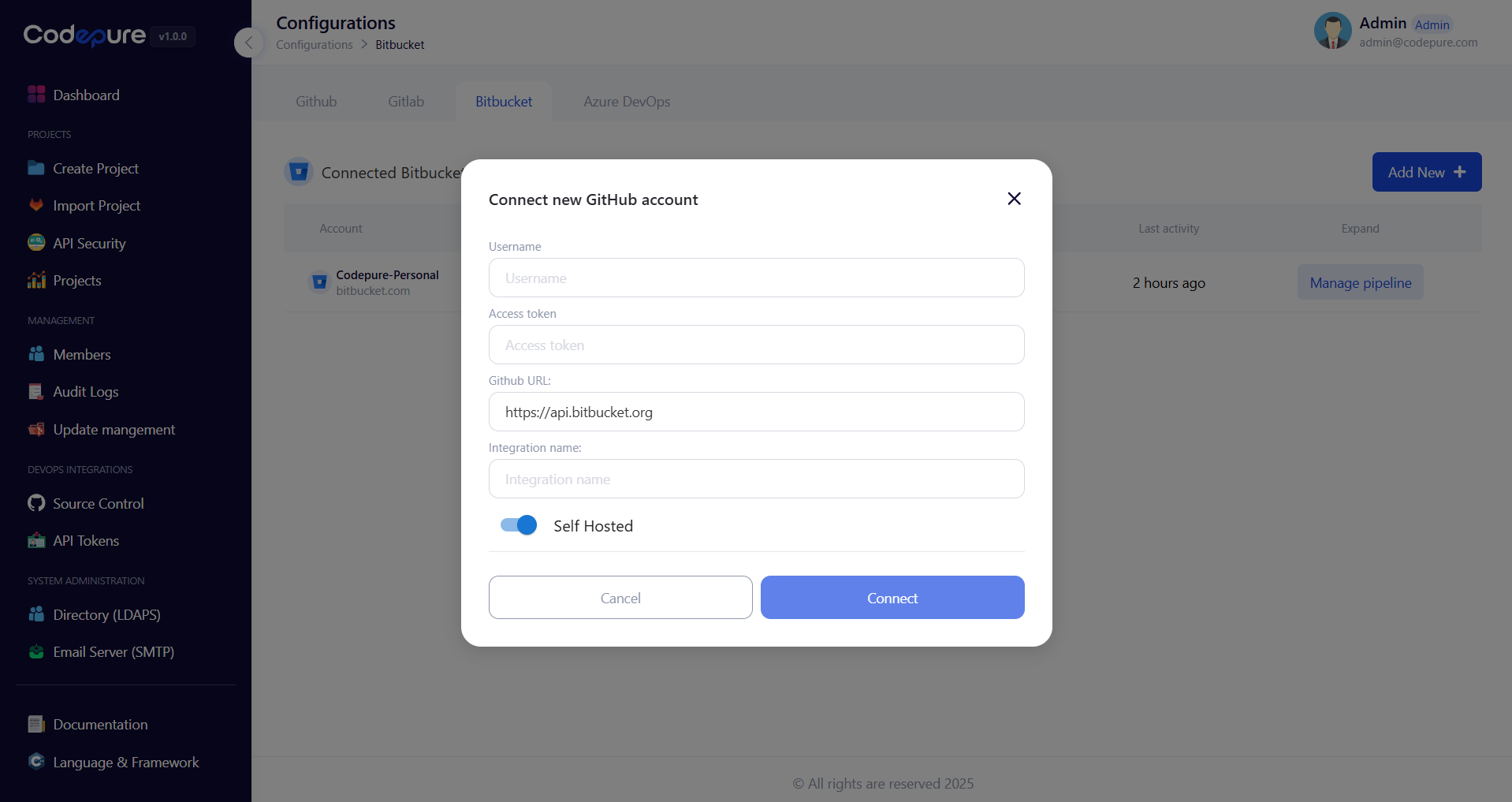 ***
### 📝 Step 2: Fill in the Integration Form
Provide your Bitbucket details as follows:
| Field | Description |
| -------------------- | ----------------------------------------------------------------------------------------------------------- |
| **Username** | Your Bitbucket username. |
| **Access Token** | A [Bitbucket App Password](https://bitbucket.org/account/settings/app-passwords/) with correct permissions. |
| **Bitbucket URL** | Use `https://api.bitbucket.org` for cloud or your enterprise URL if self-hosted. |
| **Integration Name** | Any friendly name for this integration (e.g., "Team Bitbucket"). |
| **Is Self Hosted** | Toggle on if using **Bitbucket Server** or **Data Center**. |
***
### ✅ Step 3: Save and Connect
* Click **Connect** to complete the connection.
* Codepure will validate the access credentials and link your Bitbucket account.
***
### 🚀 Step 4: Import Your Bitbucket Project
1. Navigate to **Projects**.
2. Click **Import Project**.
3. Choose **Bitbucket**.
4. Select your repository.
5. Run your security scans and manage results.
***
***
### 📝 Step 2: Fill in the Integration Form
Provide your Bitbucket details as follows:
| Field | Description |
| -------------------- | ----------------------------------------------------------------------------------------------------------- |
| **Username** | Your Bitbucket username. |
| **Access Token** | A [Bitbucket App Password](https://bitbucket.org/account/settings/app-passwords/) with correct permissions. |
| **Bitbucket URL** | Use `https://api.bitbucket.org` for cloud or your enterprise URL if self-hosted. |
| **Integration Name** | Any friendly name for this integration (e.g., "Team Bitbucket"). |
| **Is Self Hosted** | Toggle on if using **Bitbucket Server** or **Data Center**. |
***
### ✅ Step 3: Save and Connect
* Click **Connect** to complete the connection.
* Codepure will validate the access credentials and link your Bitbucket account.
***
### 🚀 Step 4: Import Your Bitbucket Project
1. Navigate to **Projects**.
2. Click **Import Project**.
3. Choose **Bitbucket**.
4. Select your repository.
5. Run your security scans and manage results.
***